


LeReader- Navigate New Tales
4.6619.00 Reviews
App Specs
- Version
- 2.26.0
- Updated On
- License
- Free
- Downloads
- 500,000+
- Developer
- Q-VON TECHNOLOGY
- Categories
- Entertainment
- Platform
- Android
Screenshots

 Analysis by AppCompare
I tend to judge a reading app by what happens after the first few minutes: can I find a story, settle into it, and return without turning reading into another task? LeReader-Fantastic Novels is an entertainment app from Q-VON TECHNOLOGY built around romance and other serialized fiction. My take is that it suits readers who enjoy discovering ongoing stories on a phone, especially when a small, repeatable reading habit matters more than a large collection of ebook-management tools.
Finding a story and making reading a habit
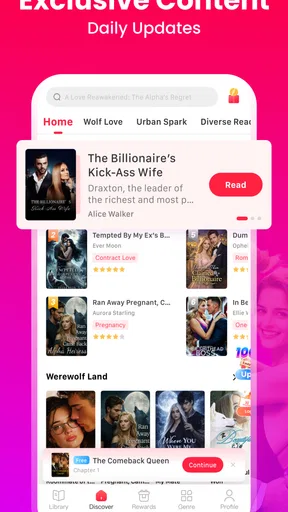
Opening up LeReader-Fantastic Novels for the first time was like stepping into a digital library that feels both expansive and welcoming. The app sports a clean, intuitive design that doesn’t overwhelm you with too many options right off the bat. Navigation is a breeze, with everything neatly categorized. Whether you're a fan of fantasy, romance, or mystery, you’re bound to find something that tickles your fancy.
The interface is sleek and user-friendly, which is a big plus for someone who's not a tech wizard. I loved how the app didn’t bombard me with ads every five seconds, unlike many other free reading apps. It’s like the developers knew exactly what we bookworms need—a peaceful reading environment.
A practical first-session routine
When I try a fiction app, I avoid collecting a dozen promising titles before I have finished even one chapter. I browse for a story that matches my mood, read enough to decide whether its voice works for me, and then keep my active reading list small. That approach is especially useful with serial fiction: a dramatic premise can grab me quickly, but the writing and pacing are what make me want to return.
LeReader is free to install, and its average rating is 4.7 from around 7,600 ratings, with more than 500,000 installs. Those figures suggest an established audience, but I would treat them as a starting point rather than a substitute for sampling a story yourself. A reader who enjoys romance-led plots may find the library a better fit than someone mainly looking for literary fiction or a tool for managing books bought elsewhere.
For a realistic routine, I might browse at home, choose one story, and read a few chapters during a quiet commute or while waiting for an appointment. If I have limited time, I stop at a natural break rather than beginning a new storyline just because a recommendation catches my eye. That small boundary helps serialized reading stay relaxing instead of turning into endless browsing.
Choosing and judging the novels
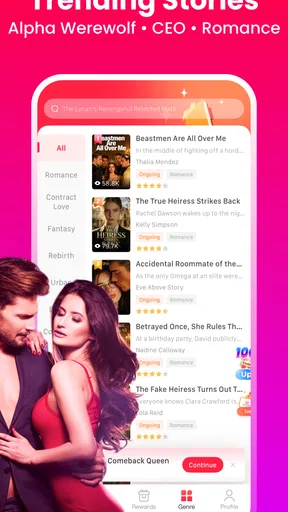
Now, let’s talk about the heart of the app—the novels. The variety is impressive. From well-known titles to hidden gems, there’s a treasure trove of content waiting to be explored. I was pleasantly surprised by the quality of the novels available. The app offers both free and premium content, so there's something for everyone.
Worth Reading Before You Choose

EA SPORTS FC Mobile 26 Is a Bigger Football Game, but It Takes Time

Flipboard Shows What News Apps Must Do Beyond the Feed

Switching to Android Auto Means Rethinking Your Driving Routine

Google Calendar Makes a Crowded Week Easier to Manage

Ludo King Makes the Most of the Minutes Between Plans

Baby Panda World Brings Quick Play to Modern Phones, but Its Game Library Feels Busy
What really caught my eye was the way the app updates its library regularly. There’s always something new to discover, and the personalized recommendations are spot on. It’s like having a bookish friend who knows your taste better than you do!
Even when recommendations seem well matched, I would use them as a browsing aid, not a verdict on what I will enjoy. A useful test is to compare the opening chapters of two different stories before committing attention to one. If I keep postponing a title, I take that as a sign to move on; a large catalogue is only valuable when it helps me find a story I actually want to read.
The app’s romance focus is a strength for readers who want relationship-driven plots and quick access to another chapter. It is a narrower proposition than a general ebook reader, where the main appeal may be importing personal files or organizing books from many publishers. If I wanted to read a novel I already own, keep a carefully curated personal library, or browse beyond fiction, I would choose a different kind of app.
Comfort settings and offline planning
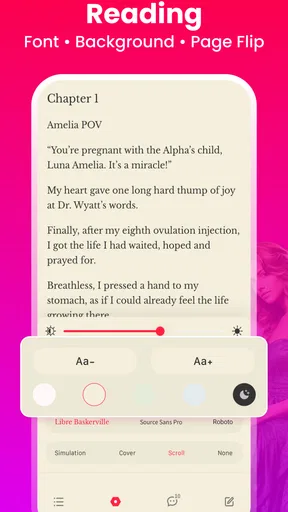
The reading experience on LeReader is nothing short of fantastic. The text is crisp, and you can customize the font size and style to suit your comfort. There’s also a night mode, which is a lifesaver for those late-night reading marathons. The page transitions are smooth, and I didn’t experience any lag, even on my older device.
Before settling in for a longer session, I’d check the text size and style rather than waiting until my eyes feel tired. A comfortable setting makes it easier to keep reading without constantly adjusting the screen. Night mode is handy in a dim room, though I’d still keep brightness comfortable; a dark interface does not automatically make a very bright screen easy on the eyes.
Another feature worth mentioning is the offline reading option. It’s perfect for when you're on the go and don’t want to burn through your data. Just download the novels you want, and you're set for a long journey or a quiet evening at home.
For a commute or travel day, I would prepare by downloading the current story while connected, then open it before leaving to make sure I have the right title ready. That is a simple but useful habit: it avoids relying on a signal at the moment I want to read. I would also download only what I expect to read soon, rather than treating offline access as a reason to stockpile chapters I may never open.
Repeatable shortcuts, not endless browsing
Experienced readers can make a serial-fiction app feel faster by repeating a few choices: keep one main story in progress, use recommendations when that story reaches a pause, and reserve browsing for a separate session. This reduces the familiar loop of opening an app, scanning covers, and leaving without reading. It also makes it easier to notice whether a new title genuinely fits my taste.
If I read in short bursts, I try to finish a chapter or stop at a clear scene break before putting the phone away. That makes it easier to pick up the thread later. For a longer evening session, I adjust the display once at the start and leave it alone unless the room lighting changes. These are ordinary habits rather than secret features, but they help the app serve the reading instead of interrupting it.
LeReader runs on Android 7.0 or later, and the current version is 2.24.1. The app is free, though in-app purchases range from $0.99 to $349.99 per item. I would check the purchase screen carefully before paying and decide whether a particular premium option suits my reading pace. The range is broad, so “free to start” should not be mistaken for every story or reading choice being free.
Community, costs, and the trade-offs
LeReader also comes with a vibrant community aspect. You can join discussions, follow other readers, and even share your thoughts on the novels you’ve read. It’s a nice way to connect with like-minded people and discover what others are enjoying.
There’s this sense of camaraderie that makes the app more than just a reading tool. It turns it into a communal space where literature lovers can come together, share insights, and even make a few new friends along the way.
I see the social side as optional rather than essential. Readers who enjoy hearing what others think may use discussions to find a title they would otherwise miss. If I want a quiet, private reading session, I can simply focus on the novel and leave community activity aside. That distinction matters: social features are a bonus for some people, but they are not a reason by themselves to choose a fiction app.
While the app offers plenty of free content, there’s also a subscription model for those who want access to premium novels. The pricing is competitive and offers good value for the breadth of content available. Plus, it’s a great way to support the authors and the app developers, keeping the ecosystem thriving.
They often have promotions and discounts, so keep an eye out for those if you decide to dive into the premium pool. It’s worth it if you’re a voracious reader looking for quality content.
I would be cautious about paying simply because I have reached a cliffhanger. First, I’d see whether the story remains compelling over time and whether I expect to read enough to justify the specific purchase offered. The app is Teen-rated, so it is intended for teen audiences and older, not as a general children’s reading choice; families should consider that rating when deciding whether it is suitable.
Compared with a general-purpose ebook reader, LeReader is more appealing when I want a discovery-oriented experience centered on serialized fiction. A library app or a reader that handles my own files is more useful if I already have a collection and want broad format or organization tools. A physical book is still better when I want to avoid phone distractions altogether. The right choice depends less on which app has the longest catalogue and more on how I actually like to read.
Who will enjoy it—and who may not
In a nutshell, LeReader-Fantastic Novels is a must-have for anyone who loves to read. It’s got the right mix of usability, content variety, and community engagement. Whether you're a casual reader or a die-hard bookworm, this app has something to offer.
I would especially recommend trying it if romance and serialized stories are already part of your reading routine, or if you want an easy way to fill small pockets of free time. Readers who prefer standalone books, a highly controlled personal library, or fiction outside the app’s main appeal may be happier elsewhere. And if you know that in-app purchases tempt you to spend more than planned, decide on a limit before browsing premium options.
If you're looking to escape into new worlds, discover amazing stories, and connect with fellow readers, give LeReader a shot. It’s like having an entire library in your pocket, ready to whisk you away at a moment’s notice.
So, what are you waiting for? Grab a cozy spot, open up LeReader, and let the adventures begin!
My verdict after weighing the details
LeReader’s best use is straightforward: find a story you genuinely want to follow, make the display comfortable, and build a reading routine around it. Offline preparation helps when connectivity may be unreliable, while a modest active reading list keeps recommendations from taking over the session. Those habits make the experience more focused without pretending the app needs complicated setup.
My recommendation is positive, with a clear caveat. This is a good fit for readers drawn to romance and ongoing fiction who want convenient reading on a phone; it is not the best match for people seeking a universal ebook library or a reading experience separate from phone use. Try a free story first, judge it by its writing and pacing, and only consider spending once you know the app fits the way you read.
Pros
- Wide variety of genres available.
- User-friendly interface design.
- Offline reading mode included.
- Regular updates with new content.
- Customizable reading settings.
Cons
- Limited free content access.
- Frequent in-app advertisements.
- Subscription can be pricey.
- Requires internet for updates.
- No audiobook feature available.
FAQs for LeReader- Navigate New Tales
What is LeReader-Fantastic Novels and how does it work?
LeReader-Fantastic Novels is a digital reading platform that provides access to a vast collection of novels across various genres. Users can browse, download, and read their favorite books directly within the app. It offers features like customizable reading settings, bookmarks, and offline reading, making it convenient for book lovers to enjoy literature on the go.
Is LeReader-Fantastic Novels free to use, or does it require a subscription?
LeReader-Fantastic Novels offers both free and premium content. While users can access a selection of novels for free, a subscription may be required for premium titles and additional features. Subscription plans vary, providing options for monthly or yearly memberships, which unlock exclusive content and ad-free reading.
Can I access LeReader-Fantastic Novels offline, or do I need an internet connection?
Yes, LeReader-Fantastic Novels supports offline reading. Users can download their favorite novels to their devices and access them without an internet connection. This feature is particularly useful for readers who want to enjoy their books during travel or in areas with limited connectivity.
What devices are compatible with LeReader-Fantastic Novels?
LeReader-Fantastic Novels is compatible with both Android and iOS devices. It requires a minimum operating system version, typically Android 5.0 or iOS 10.0 and above. Ensure your device meets these requirements for optimal performance and access to all features the app offers.
How can I find new novels and authors on LeReader-Fantastic Novels?
LeReader-Fantastic Novels features a user-friendly interface with search and recommendation options. Users can explore new releases, top charts, and personalized suggestions based on their reading history. Additionally, the app includes genre filters and author profiles to help users discover new and exciting content tailored to their preferences.


